For consultancies
Run the practice, not the spreadsheet.
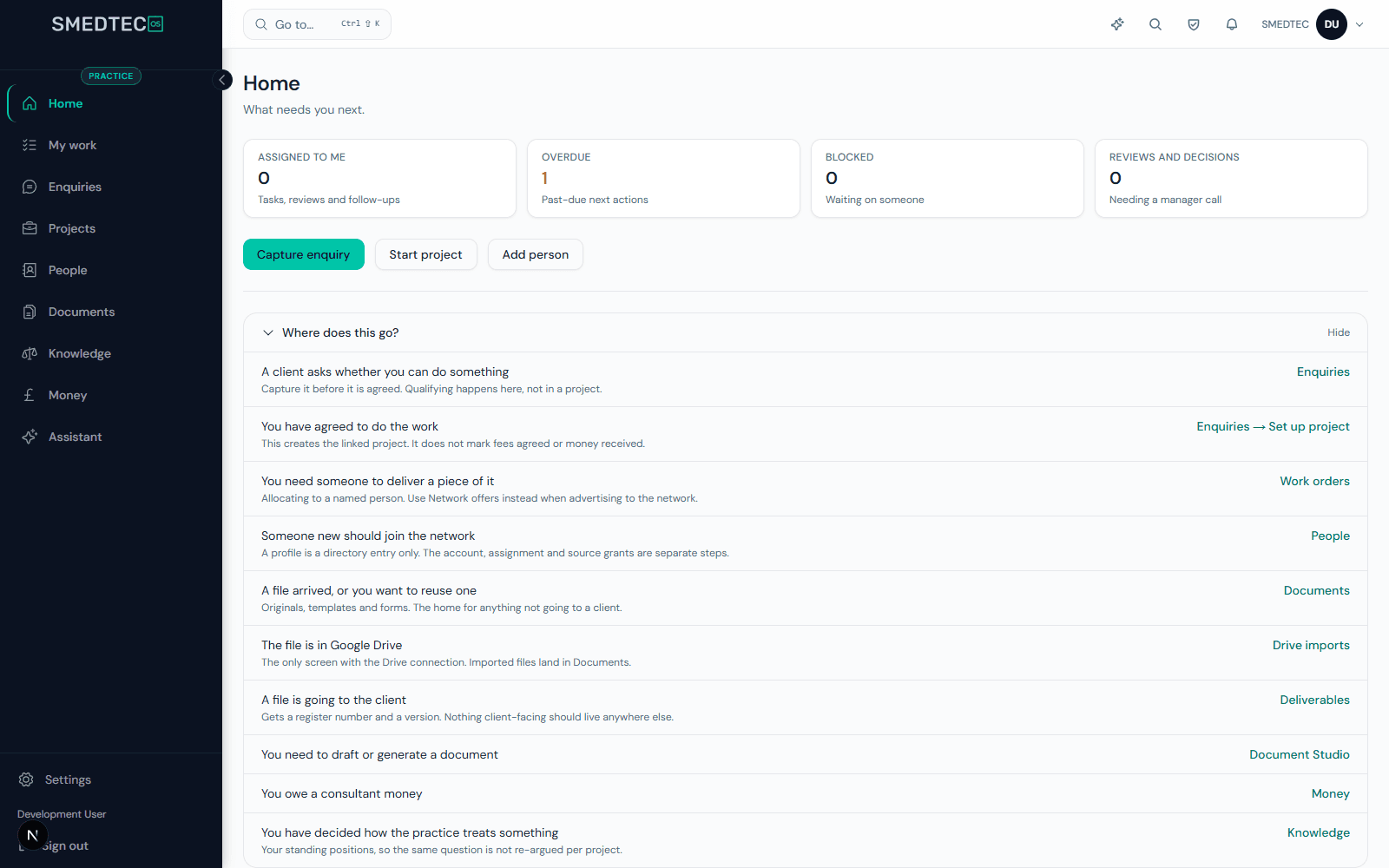
The Practice layer is the operating system for a regulatory consultancy: enquiries become quoted engagements, engagements produce numbered deliverables, positions are filed once and reused, and your consultant bench is onboarded, matched and paid from the same place. Work it from the workspace or from your AI assistant.
Free 14-day trial · Auditable from day one
The work is expert. The operations are improvised.
Consultancies sell judgement, then run it on inboxes, drives and a spreadsheet of who is doing what.
Engagements tracked by memory
Enquiries, scopes, milestones and deliverables live across inboxes and drives. Nobody can say what is due this week across every client.
Knowledge in heads, not on file
The position you took on a borderline classification last year exists in one consultant's memory. It gets re-derived — sometimes differently.
Deliverables without a reference
Reports go out without a document number or version chain, so a client's question two years later starts from scratch.
The bench is admin
CVs in a folder, skills in a spreadsheet, work orders and invoices by email. Growing the network grows the admin with it.
What a consultancy runs in the Practice layer
- Quotations · Engagements · Deliverables
Enquiries, quotations, engagements, deliverables
An enquiry is scoped, priced and quoted on your house Quotation & Letter of Engagement, then becomes an engagement. Every piece of work has a client, a scope, milestones and named deliverables. My-work and team-work views show what is due across the whole book, and a context ledger records what was agreed along the way.
- SMEDTEC OS connector · MCP
Worked from your AI assistant
Add the SMEDTEC OS connector to an AI assistant that supports MCP, such as Claude, and run the enquiry card from a conversation. Capture an enquiry from an inbound email, log correspondence, record scope and fee, finalise the Quotation from your house template and mark it as sent. Nothing it does sends email or deletes data.
- Reference numbers · Versions · Approvals
Document Studio
Draft, version and approve client documents in families with shared reference numbering, from templates your firm owns, with imports from Drive.
- Positions · Practice Assistant
Knowledge and positions
File the positions and constraints your practice has established, review them, and let the Practice Assistant answer from your own filed knowledge in your firm's writing style. Nothing unreviewed reaches a prompt.
- CV intake · Taxonomy · Work orders · Invoices
Consultant network
Bring consultants in by CV, classify skills on a controlled taxonomy of sector, discipline, jurisdiction and credential, publish opportunities, issue work orders inside a project and receive invoices into a commercial ledger.
- Fortnightly · Personalised
Consultant Radar
Every seated consultant receives a fortnightly regulatory digest matched to their own markets and expertise — built only from the public regulatory catalogue, never from client data.
- EU AR · UK RP · US Agent · TGA Sponsor
Rep Hub when you also hold mandates
Hold EU Authorised Representative, UK Responsible Person, US Agent and TGA Sponsor mandates for clients, with statute-cited obligations, jurisdiction identifiers and daily renewal sweeps, in the same workspace as the consulting work.
- Briefings · Grounded assistant
Briefing Studio and Datum
Generate source-audited market-access briefings for a client, and ask Datum questions of your own vault and knowledge with cited, evidence-gated answers.
- Payables · Reports
Money and reports
Payables to your network, operations reports across engagements, and per-client commercial metrics in the client directory.
Practice layer on every consultancy trialRep Hub includedAI connector includedUK & EU GDPR
Questions from teams like yours
Is the Practice layer included in a consultancy trial?
Yes. A workspace created as a consultancy or rep firm has the Practice layer switched on from its first session, alongside Rep Hub.
Can consultants outside our firm work in it?
Yes. Consultants in your network hold a seat rather than a membership of your organisation: they sign a network agreement, apply to the opportunities you publish, receive work orders inside an activated project and invoice through the platform, all from their own workspace.
Does the Practice Assistant see other firms' data?
No. It answers only from your organisation's documents, context records and reviewed positions. Retrieval is scoped to your organisation at the database level, and unreviewed material never reaches a prompt.
Can we run statutory representation and consulting for the same client?
Yes. A client in your book can hold both a consulting engagement in the Practice layer and a representation engagement in Rep Hub, against one client record in your firm's workspace.
Do our clients need their own SMEDTEC OS workspace?
No, but they can have one. A client with its own workspace can approve a connection your firm requests under a Rep Hub consultancy engagement, and chooses which products you see, read-only. A client without one can be held as a private record in your practice, or you can manage a workspace on their behalf.
Move the practice in.
Create your firm's workspace, log your first enquiry and take it to a sent quotation, from the workspace or from your AI assistant. Fourteen days with everything switched on, then Free, Firm or Firm Plus.
Start your firm's trial