The operating system for regulatory firms
Run your regulatory firm from one place.
And from your AI assistant.
Clients, mandates, quotations, deliverables and your associates in one firm workspace, for consultancies and for EU AR, UK RP, US Agent and TGA Sponsor firms. Your clients keep their own records, in their own workspace.
Free plan for one-person firms · Firm plan £149/month · 14-day Firm Plus trial, no card needed
- SOC 2 audited infrastructure
- UK/EU data residency
- Published DPA
- Tamper-evident audit trail
Built around your role
Your book of work.
Somewhere to run it.
Regulatory firms sell judgement. The enquiries, mandates and deadlines behind it deserve better than an inbox.
I run a consultancy
Regulatory consultancies
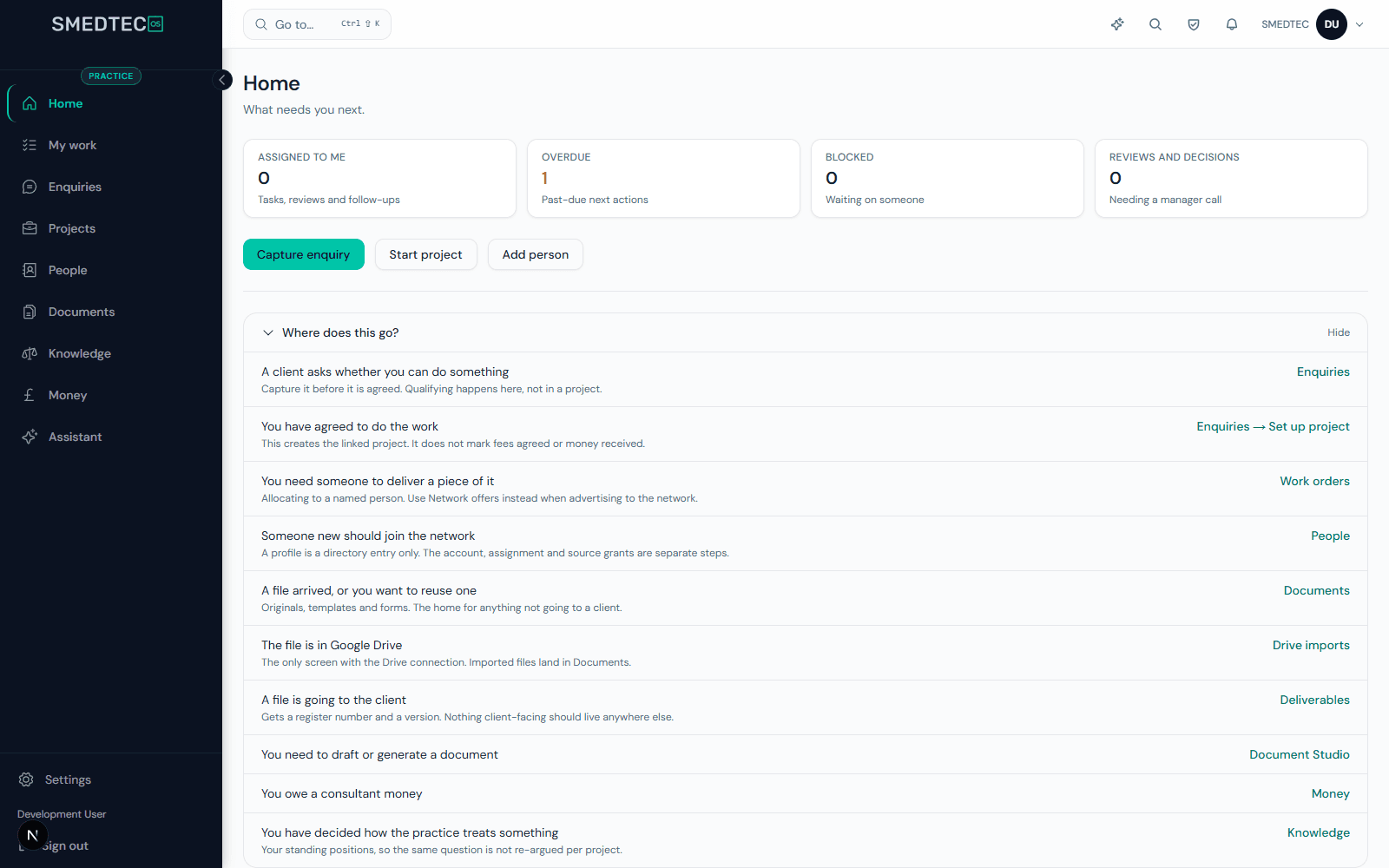
Enquiries, Quotations, projects, deliverables and your associates in your firm's workspace, with Mandates included and the whole thing workable from your AI assistant.
Opens PracticeWhat it opens
- Enquiries and Quotations
- Projects and deliverables
- Associates and firm knowledge
- Mandates, included
Your firm's workspace. Your clients keep theirs.
I hold mandates
EU AR · UK RP · US Agent · TGA Sponsor
EU AR, UK RP, US Agent and TGA Sponsor mandates held across every client: obligations cited to the provision that creates them, identifiers, renewals, and complaints forwarded with the time evidenced.
Opens MandatesWhat it opens
- Obligations cited to their provision
- SRN, MHRA, FDA and ARTG identifiers
- One deadline board across every mandate
- Complaints forwarded, with the time evidenced
EU AR · UK RP · US Agent · TGA Sponsor, for devices and IVDs.
I'm a manufacturer working with a firm
Manufacturers
Keep your record in your own workspace and let your firm connect, read-only, to the products you choose. Or have your firm run a workspace for you.
How it works with your firmWhat it opens
- Your own workspace and record
- Read-only access, one product at a time
- End access whenever you choose
- Or a workspace your firm runs for you
Nothing is shared until you approve it.
- Obligations cited to their provisionAcross the four statutory roles
- 38
- Statutory rolesEU AR · UK RP · US Agent · TGA Sponsor
- 4
- Regulatory and market sources monitoredFDA · MHRA · EUDAMED · TGA · Health Canada
- 24
- Of Firm Plus to startNo card needed
- 14 days
One platform, across the work
From the first enquiry to the next obligation.
The operating system for a regulatory consultancy — from enquiry to numbered deliverable, with the firm's knowledge on file and its associate network inside the same workspace.
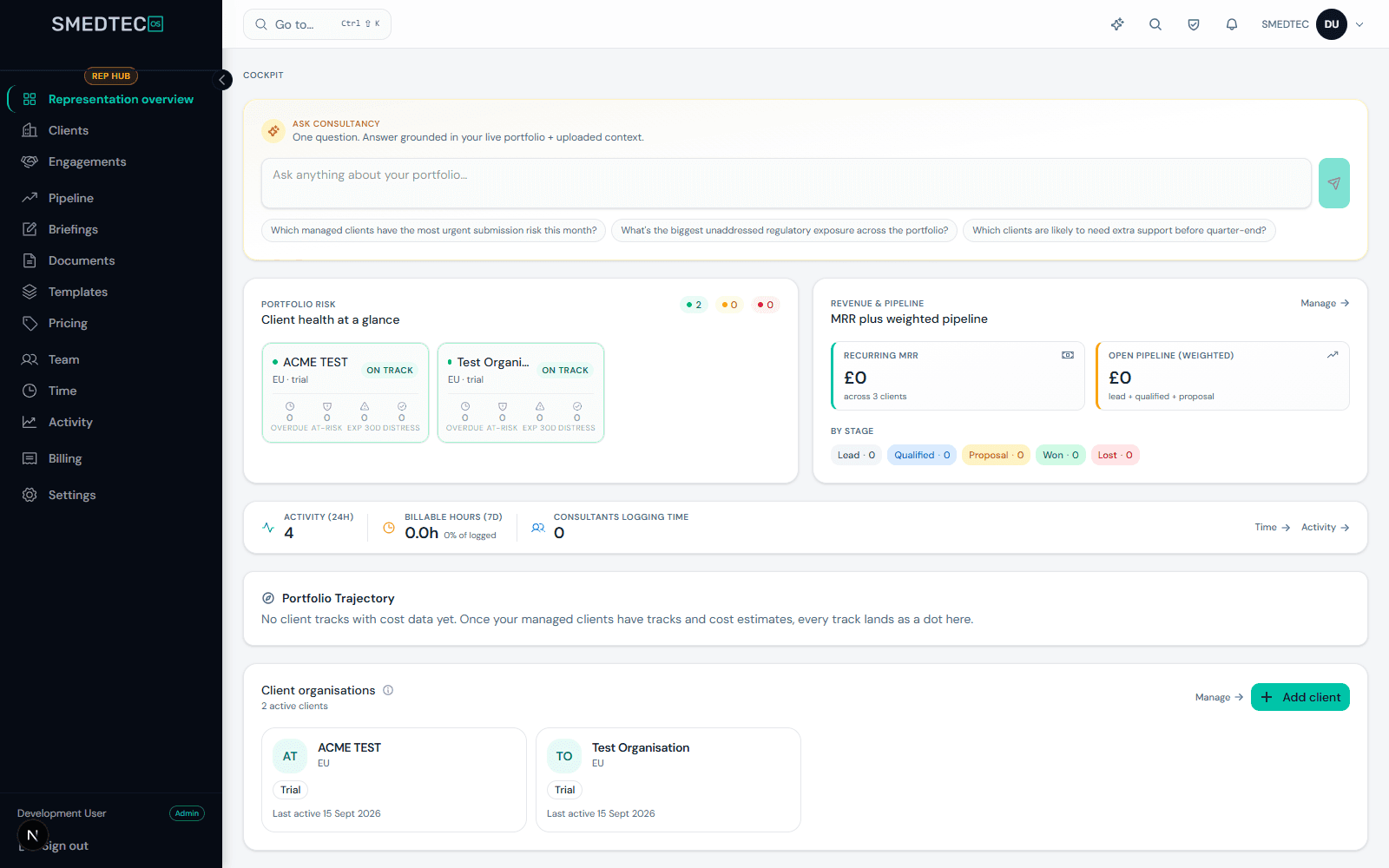
For firms acting as EU Authorised Representative, UK Responsible Person, US Agent or TGA Sponsor, for medical devices and IVDs: one mandate per client and per role.
Plug SMEDTEC OS into Claude, ChatGPT or any AI assistant that supports MCP, and do the work from the chat: log an email, draft the Quotation, check what is due across your mandates. It works as you, in your firm, on your real records.
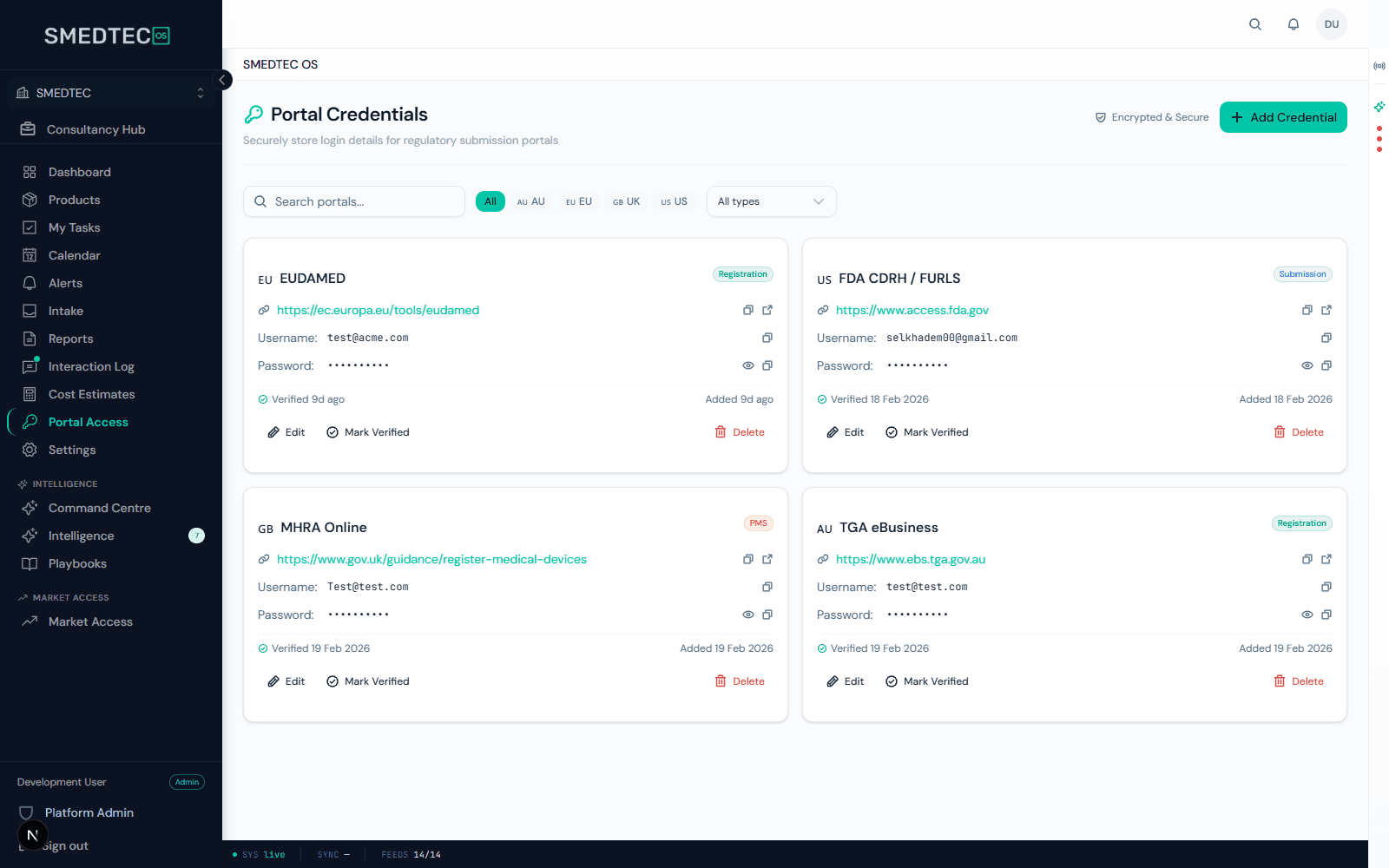
For the manufacturers your firm serves: their own workspace, connected to yours when they approve, or one your firm runs on their behalf. One record per device, and everything a regulatory team does hangs off it: pathways, registrations, post-market cycles, evidence and cost.
A daily, personalised signal feed routed against your markets and device classes, and a public newsletter built from the same catalogue.
Isolation enforced in the database
Every firm's workspace is isolated from every other at the database level, on SOC 2 audited infrastructure in London.
Your client's records stay theirs
Product records stay in your client's workspace. They approve access, one product at a time, read-only.
A tamper-evident audit trail
Every upload, review and status change is logged with who and when. Our DPA is published.
Plans for regulatory firms
Free to start.
Priced for a working firm.
Every new firm workspace starts with fourteen days of Firm Plus. No card needed.
Free
£0
A plan, not a trial that expires
For the one-person consultancy: run your first clients and a mandate until you're busy enough to need more.
Start freeSolo
£49
/ month
For the independent consultant with a full book: unlimited clients, on your own.
Start trialFirm
£149
/ month
The plan for a working firm: the consultancy and its statutory mandates in one workspace, with staff.
Start trialFirm Plus
£349
/ month
For a firm with associates, a growing book of mandates and its own name on everything a client sees.
Start trialFirm Scale
£799
/ month
For an established firm running a large book of mandates across many staff.
Start trial
What is SMEDTEC OS?
SMEDTEC OS is the operating system for regulatory firms. Consultancies and firms acting as EU Authorised Representative, UK Responsible Person, US Agent or TGA Sponsor run their clients, mandates, quotations, deliverables and associates in one workspace, and can work it from an AI assistant through the SMEDTEC OS connector. Their manufacturer clients keep their own records in their own workspace, or have the firm run one for them. It complements your eQMS and does not replace it.
Who is SMEDTEC OS for?
Regulatory firms first: consultancies, and firms holding EU Authorised Representative, UK Responsible Person, US Agent or TGA Sponsor mandates, from a one-person firm to a firm with its own network of associates. Medical device and IVD manufacturers who work with those firms can have their own workspace and connect it to their firm on their own terms. Each has its own page on this site.
I'm a one-person consultancy. Is this for me?
Yes. The Free plan is for one person with up to three clients and one mandate, and includes the connector. Solo, at £49 a month, lifts the client limit while you work alone; when you take on staff, the Firm plan adds three seats and five mandates for £149 a month. Every new firm workspace starts with fourteen days of Firm Plus.
Do my clients need to log in?
No. A client can be held as a private record in your firm's workspace: their contacts, enquiries, Quotations and projects sit there, and they never see a login screen. If a client wants a workspace, your firm can manage one on their behalf, or they can run their own and approve a connection to yours.
What can an AI assistant actually do in my workspace?
SMEDTEC OS is exposed as an MCP connector, so any AI assistant that supports MCP connectors, such as Claude or ChatGPT, can work in your firm's workspace as you. In Practice you can find and open enquiries, capture a new one from an inbound email, log correspondence, add contacts, record scope and fee, finalise the Quotation from your house template and mark it as sent. In Mandates you can review mandates, deadlines and obligations, complete or add deadlines, log a new vigilance case, and (owners and admins) end a mandate. Nothing it does sends email or deletes data.
Is my client data visible to SMEDTEC Ltd or other firms?
No. Every firm's workspace is isolated from every other at the database level. SMEDTEC Ltd runs its own consultancy on SMEDTEC OS as an ordinary tenant, with no view into yours, and platform administrators cannot open a firm's Practice records.
Which regulatory frameworks and pathways does SMEDTEC OS support?
SMEDTEC OS is built around EU MDR and IVDR (CE marking), the UK regime under UK MDR 2002 as amended (UKCA marking), FDA pathways (510(k) clearance, De Novo, PMA), and registrations with MHRA, TGA, Health Canada and EUDAMED. It supports ISO 13485, ISO 14971 and IEC 62304 ways of working; it is not a QMS and does not claim conformity with any standard on your behalf.
Does SMEDTEC OS replace my eQMS?
No. It complements your eQMS rather than replacing it. SMEDTEC OS focuses on regulatory operations: managing submissions, maintaining the technical file, tracking registrations, and running post-market activities. It gives your regulatory team a purpose-built workspace alongside the quality system you already run.
How does SMEDTEC OS help with EU MDR compliance?
It helps you organise and evidence the work EU MDR requires: structuring technical documentation, tracking submission and renewal deadlines, managing post-market surveillance programmes, recording change assessments against the product version they affect (significant change for legacy devices under the Article 120 transitional provisions, or a substantial-change notification to the notified body for MDR-certified devices; the route is your decision), and keeping a tamper-evident audit trail of every action. Compliance remains your responsibility. SMEDTEC OS makes the underlying work easier to manage and easier to demonstrate.
Can SMEDTEC OS help with FDA 510(k) submissions?
Yes. You can break each 510(k), De Novo, or PMA submission into phased work items with owners, due dates, and dependencies that mirror your real approval process. For submissions that rely on real-world evidence, it captures the metadata the FDA's real-world evidence guidance asks for: a source register and a relevance and reliability checklist. It records documentation and traceability only; patient-level clinical data is never stored or analysed.
Do you cover IVDs?
Yes. Mandates and client records work the same way for IVDs: an EU AR under the IVDR, a UK RP for IVDs under UK MDR 2002, a US Agent or a TGA Sponsor. Obligations in the library cite the MDR provision today.
Is my data secure?
Security and data protection are core to the platform: role-based access control, approval workflows, and tamper-evident, immutable activity logging of every upload, review, and status change. See the Security page for details on our posture and data handling.
Can a representative and its manufacturer clients work in one platform?
Yes, without pooling their data. The manufacturer and the representative each have their own workspace. The representative asks to connect under its mandate; once the manufacturer approves, the representative gets a read-only view of the products the manufacturer switches on. For clients who don't want their own workspace, the representative can run one on their behalf instead.
Where does our data sit in SMEDTEC OS?
Each organisation's data sits in its own workspace. A manufacturer's products, registrations, documents and audit trail sit in the manufacturer's workspace; a firm's mandates, projects and deliverables sit in the firm's. Workspaces are isolated at the database level, and connecting them never moves data from one to the other. A workspace a firm manages on a client's behalf is held under that firm.
Can my representative see all my products?
Only the ones you choose. Approving a representative's request shares none of your product records on its own; you then switch products on one at a time, and the access is read-only. You can switch a product off, or end the connection entirely, from your workspace settings at any time.
What happens to our records if we change representative?
If you run your own workspace, they stay in it. Ending a connection removes the firm's view immediately and is recorded in your activity log; your products, registrations, documents and history are untouched, ready for the next firm you approve. A workspace your representative manages for you is held under their firm, so agree how it is handed over before you change.
SMEDTEC Intelligence
Free regulatory and market-access intelligence, in your inbox.
What changed across EU MDR, FDA and UKCA, with the data behind it. Plain English, no spam.
Bring your firm in.
Create your firm's workspace, log your first enquiry or mandate, and connect your AI assistant. Fourteen days of Firm Plus, then choose a plan or stay on Free.